Class one learnt about the functions of a computer. A computer doesn't understand information but it understands data. Likewise a computer can only understand 1s and 0s.
There are many advantages to using a computer including, speed, reliability and consistency.
Dis-Advantages include: Health risks, privacy and environment effects in a computer's disposal.
Web 2.0 is the 2nd generation of interacting with the web where uses can create, edit and interact with content on the web.
System software is software that's including at the very basic level on a computer's OS. It has utilities and abilities to manage files on the OS.
Application software on the other hand has a specific task in mind. With the aim of making a task easier or more accurate. Application software also increase productivity within a business.
There are several forms of software some that are free while others must be purchased. The following are some of those categories including; Freeware, Shareware, Open-source, Public Domain, Packaged software and custom software.
Compute Uses may include using a computer for home, office or big enterprise. While small home offices may only use a computer for gaming or for creation of documents an enterprise would generally use a computer to increase productivity.
Professional Ethics
Ethics include; Moral codes, morality, ethics and virtues.
The Australian Computer Society is responsible for governing the very basic ethics that IT professionals must adhere to which include the following values: Quality of live, province of information, honesty, competency and professionalism.
Prevention of Viruses can be done by implementing firewalls, setting rules for email attachments (don't open emails from unknown senders) or signing up to a website that sends out regular virus alerts and hoax warnings.
Honeypot is another method of combating viruses. Where the honeypot is used to deliberately attract viruses and hackers.
Accesstime is the ammount of time it takes the processor to read memory.
IPS - Is the measurement used to measure the amount of instructions a processor can carry out per second.
Output devices include: Printers, audio and more recently force feedback.
Calculating the size of an image??? BMP that is.
Resolution x Depth = Filesize in bits (Convert to bytes (/8) then to KB (/1024)
Lossy is exactly what it means it looses information.
Lossless retains the information when an image is compressed or changed.
CD quality audio is stereo and is stored in digital form. The sound waves we hear are analogue and the audio we hear from a computer or electronic device is digital.
The size of an audio file is calculated by = (x2 for stereo) time x sample rate x (depth/8) = Size in MBs.
Vector graphics are complex and use mathematical forces.
Project managers are responsible for the project costing, reporting and creating a project proposal.
Success is measued by good planning, requirements meet for all stakeholders, time frame
Failure is the result of bad planning, impossible schedules and lack of funds.
Constraints are related to the quality of a project... Cost, Time, Scope = Quality.
Reduced Cost = Increased Time, lack in quality.
Enterprise computing includes; retail, wholesale, transportation and government.
Cloud computing is a service delivered through the internet.
Grid computing is a number of PCs that share services and act as one large computer.
Data is organized into layers - Files, records and characters.

~ Studying Journalism at JCU in Townsville, Australia.
Showing posts with label Computer Studies CP1030. Show all posts
Showing posts with label Computer Studies CP1030. Show all posts
Wednesday, November 9, 2011

Tuesday, October 11, 2011
What is Enterprise Computing
Enterprise Computing involves the use of computer in a network working together including: Retail, Educational, Wholesale, Transportation, Government, etc.
Enterprise computing is the underlying architecture that allows the underlying information to flow.
In an enterprise, users typically fall into one of four categories; Executive management, middle management, operational management and nonmanagement employees.
For example - Nonmanagement Employees - Need information in order to perform their job.
As you go up the lader operational management make day-2-day decisions. They normally require short-term decision information material.
Execs make decisions to ensure long term growth. They are very strategic decisions made with long-term goals.
Virtualization and Cloud Computing
Virtualization is the practice of sharing or pooling computing resources. There are two categories of Virtualization:
Enterprise computing is the underlying architecture that allows the underlying information to flow.
In an enterprise, users typically fall into one of four categories; Executive management, middle management, operational management and nonmanagement employees.
For example - Nonmanagement Employees - Need information in order to perform their job.
As you go up the lader operational management make day-2-day decisions. They normally require short-term decision information material.
Execs make decisions to ensure long term growth. They are very strategic decisions made with long-term goals.
Virtualization and Cloud Computing
Virtualization is the practice of sharing or pooling computing resources. There are two categories of Virtualization:
- Server - Provides the capability to divide a physical server logically into many virtual servers.
- Storage - Provide the capability to increase and create single logical storage devices from many physical storage devices.
Cloud Computing is an internet service that provides computing needs to computer users.
Grid Computing combines many services or personal computer to act as one large combined computer.
Key Terms in developing an enterprise network includes; Scalability and Interoperability.
- Scalability is the measure of how well the hardware or computer information system can grow to increasing performance demands.
- Interoperability is the ability for an information system to share information to other information systems within an enterprise.
Launched in 1989, the WWW was not originally designed for integrating multimedia. It was designed as a method of delivering simple text documents formatted in HTML.
The first browser was the Mesh (Berners Lee 1989)
Mosaic was introduced in 1993 (inline images and ease of use)
Non Web browsers differ in features, performance and cost.
Site Planning and Design
Web site design does not begin with making a Web page. A logical procedure should be followed to provide a blueprint for the effetive design and layout of individual pages and links.
The design depends on the purpose and target audience of the Web site.
A website should attract visitors, maintain interest, satisfy the users needs, ensure the site is bookmarked for future visits.
Site Planning and Design
Types of Web sites:
Instructional (educational)
Informational
Promotional (advertisement)
Entertainment
Social
Factors to consider when planning a Website:
- Purpose of the site. Target Audience, the User's browsers.
Site Purpose
The purpose of the site should be clearly defined.
Ensures the the design plan works towards satisfying the purpose; not the creative needs of the designer.
Purposeful design is the key trick to website design.
Target Audience - Requirements and needs are paramount in effective web design. Clearly define who will use your web site and what needs they have. Identify characteristics and demographics such as; gender, age, socio-economic background, education level, computer literacy level, etc.
Identify characteristics and demographics such as: gender, age, socio-economic background, education level, computer literacy level, etc.
A user must always know what page they are on at any one point in time in your website.
There are four types of navigations structures: linear structure - Forward and Backwards (One page at a time), hierachical structure, non-linear structure, composite structure / hybrid (organised as a mixture of linear and hierachical structures).
Tuesday, October 4, 2011
Computer Programming and Programming Languages

Machine language is classified as a first generation language - 1GN.
Assembly Language is the second generation language - 2GN.
Programmer writes instructions using symbolic instruction codes. A source program contains the code to be converted to machine language.
3GN languages are allot more easier to program in. Which can then be converted to 1GN or 2GN languages.
In a procedural language, the programmer writes instructions that tell the comptuer what to accomplish and how to do it.
Third-Generation Language (3GL)
A third generation can compile and translate an entire program before executing it. An interpreter converts an executes one code statement at a time.
Source Program + Data > Interpreter > Results (EXE - The compiled program)
Object-Orientated Programming Languages and Program Development Tools
An object-orientated programming language allows programmers the ability to reuse and modify existing objects.
Other advantages include; objects can be reused, works well in a RAD environment, Programmers create applications faster.
Microsoft .NET Framework allows many types of programs to run onthe internet or an internal business network, as well as computers and mobile devices.
Features include: CLR (Common Language Runtime), Classes.
Visual Studio is a Microsoft suite of programs developed as tools to assist with programming.
A 4GL Language is a non-procedural language that enables users and programmers to run a query with using procedures. Examples of these are MySQL, SQL and CFM.
Web Page Development is just a markup language. It is a very limited language.
HTML is a special formatting language that programmers use to format documents for display on the Web. XHTML is a markup language that allows Web sites to be displayed more easily on mobile devices.
XML is a way for Web developers to create customized tags and use predefined tags to display content appropriately on various devices. WML is a subset of XML and is used to design pages for microbrowsers.
Two applications of XML are RSS 2.0 and ATOM.
Programmers write scripts, applets, servlets, or ActiveX controls using a variety of languages.
Javascript, Perl, PHP.
Web Page Development
Web 1.0 - Looking at the content or change the webpage.
Web 2.0 - Provides a mean to change or modify the content in some way. Creating a Blog, Wiki, Facebook, Bebo, Twitter etc.
Web 3.0 - Data driven.
Web page Authoring Software can create sophisticated Web pages that include images, video, audio animation etc.
Other authoring tools include, ToolBook Director which are designed for different platforms.
When creating a Program - Step One - Analyze Requirements
It is writted to tbe the solution to a problem or an answer to an opportunity.
To initiate a program development, programmer must: Reviews the requirements, meets with the systems analyst and users, identifies input, processing and output.
Input | Processing | Output
The input var The processing that this step does What's the answer...
Step Two - Design Solution
In structured design, the programmer typically begins with a general design and moves toward a more detailed design. Programmers use a hierarchy template.
Object-Orientated (OO) design the programmer packages the data and the program into a single object. Encapsulation.
The selection control is an action to take, based on a certain condition. If-then-else, case, etc.
Pseudo Code is another way of going about Designing the Solution - It is a condensed form of English to convey program logic.
Step Three - Validate the Design
Check for logic errors by checking your Pseudo Code.
Step Four - Implement Design
Implementation of the design includes using a program development tool that assists the programmer by:
- Generating or providing some or all code.
- Writing the code that translates the design into a computer program.
- Creating the user interface.
Step Five - Test the Solution
Step Six - Documentation of the Solution
The Pseudo Code can be used to review the program.
System Development
System Development can follow three general guidelines. Groups activities or tasks into phases, involve users, define standards.
What is System Development
System Development should involve representatives from each department in which the proposed system will use.
Who initiates a System Development Project - A user may request a new or modified system, Organisations may want to improve hardware, software or other technology. Situations beyond an organisations control might require a change.
Analysis Phase - Consists of two major parts, conduction research and a full solution is developed.
Design Phase - Is a prototype proof of concept that can be used while the full system is being created still.
Implementation Phase - Various tests should be performed on the new system.
Tuesday, September 20, 2011
Databases, Data and Information
Data needs to be correct to be of any use as Information.
Valuable information should have the following characteristics, Accurate, Verifiable, Timely, Organized, Accessible, Useful, Cost-effective.
Data is organized into layers - Files, Records, Fields & Characters.
A record is a group of related fields - A primary key uniquely identifies each record.
A data file is a collection of related records.
File maintenance refers to the procedures that keep data current - Adding records, modifying records & deleting records.
Maintaining Data requires validation - Compares data with a set of rules or values to find out if data is correct.
An example of a file processing system is a Spread Sheet.
File Processing System can be an Excel Spreadsheet. These have been used for many years and have data redundancy and allow data to be isolated.
A Database Approach is a program where users share data. It reduces data redundancy and allows for easier access. One vulnerability to a Database is access to a database can be breached by malicious hackers.
Database Management Systems provides several tools that allow users and programs to retrieve and maintain data in the database - Query language, Query by Example, Form, Report Generator.
Valuable information should have the following characteristics, Accurate, Verifiable, Timely, Organized, Accessible, Useful, Cost-effective.
Data is organized into layers - Files, Records, Fields & Characters.
A record is a group of related fields - A primary key uniquely identifies each record.
A data file is a collection of related records.
File maintenance refers to the procedures that keep data current - Adding records, modifying records & deleting records.
Maintaining Data requires validation - Compares data with a set of rules or values to find out if data is correct.
An example of a file processing system is a Spread Sheet.
File Processing System can be an Excel Spreadsheet. These have been used for many years and have data redundancy and allow data to be isolated.
A Database Approach is a program where users share data. It reduces data redundancy and allows for easier access. One vulnerability to a Database is access to a database can be breached by malicious hackers.
Database Management Systems provides several tools that allow users and programs to retrieve and maintain data in the database - Query language, Query by Example, Form, Report Generator.
Feature Article Writing
Feature Writing requires creativity and it allows for the use of adjectives, nouns that can make the article sound more of a comment.
Preparing to write a Feature Story includes; researching, finding experts, interviewing, organising facts, analysing complex information and interpreting and converting bureaucratic language.
Qualities Required: Creativity, Maturity, Sensitivity, Ability to examine issues and personalities in depth, Accuracy, Fairness and balance.
People and Place
Human Interest and Colour Stories - Human Interest and colour stories have mass appeal and do not necessarily need a specific news angle. They can be timeless, stand-alone stories. Human Interest stories can also be 'slice of life' story.
'New' Journalism
Is far removed from 'normal' feature writing. Also known as literary journalism. Writing is more subjective and personal. Non-fiction writing that can incorporate content drawn from memory or even invented.
Writing the Description: Use detail, but do not disrupt the flow of the story Use examples and metaphors to evoke mental images. Depict reality. Concse and concrete information.
Feature Structures: Modified Inverted Pyramid, String of Pearls, Projection, Focus.
The Closer
Circular, Summary, Poetic, Looking ahead, 'That's that', 'See what I mean', All closers can be enhanced by repeating a key word or phrase used in the feature.
Chapter 14 for more information...
Preparing to write a Feature Story includes; researching, finding experts, interviewing, organising facts, analysing complex information and interpreting and converting bureaucratic language.
Qualities Required: Creativity, Maturity, Sensitivity, Ability to examine issues and personalities in depth, Accuracy, Fairness and balance.
People and Place
- People - Accents, movements, appearance.
- Place - Setting and Positioning.
- Imagery.
- Descriptive detail.
- Observation
- Characterization.
Human Interest and Colour Stories - Human Interest and colour stories have mass appeal and do not necessarily need a specific news angle. They can be timeless, stand-alone stories. Human Interest stories can also be 'slice of life' story.
'New' Journalism
Is far removed from 'normal' feature writing. Also known as literary journalism. Writing is more subjective and personal. Non-fiction writing that can incorporate content drawn from memory or even invented.
Writing the Description: Use detail, but do not disrupt the flow of the story Use examples and metaphors to evoke mental images. Depict reality. Concse and concrete information.
Feature Structures: Modified Inverted Pyramid, String of Pearls, Projection, Focus.
The Closer
Circular, Summary, Poetic, Looking ahead, 'That's that', 'See what I mean', All closers can be enhanced by repeating a key word or phrase used in the feature.
Chapter 14 for more information...
Tuesday, September 13, 2011
Project Management One - Introduction - Lecture Two
Assignment Two Information!!!
The Project plans sets out the resources available and the schedule.
The structure of the Plan - Introduction, Project Organisation, Resource Requirements (staff, hardware and software etc), Work breakdown, Project schedule, Costing, Risk analysis (monitoring and reporting mechanisms).
The stakeholders Analysis: Who are the stakeholders (clients, end-users, team members, etc)
Is there a target audience or end user - Demographic analysis, requirements. (age, gender, socioeconomic)
Issues are typically identified throughout the project and logged and tracked through resolution.
Issues not easily resolved are escalated for resolution.
What is a project Timeline - It answered the following; the tasks, how long, when & who.
For each task it determines; How long you think each task will take. (Time Required)
At what stage of the project they will need to be done? (When)
What other tasks need to be done before and after each milestone. (Relationship with other tasks)
Does this task need to be revisited several times during the project. (Contingency Plan)
Indirect Costs
This is known as overheads. Costs that are incurred as a result of equipping and being able to maintain the business.
Indirect Cost = Total Cost divided by the number of ordinary working hours in a year.
Direct Costs
Is anything that only exists as a result of a project being completed; .e.g. Hardware and Software roll out, Labor Costs, Hosting costs.
The Project Quote - Working out the quoted price for the project with a percentage of overheads and the full direct costs incorporated.
Risk Identification: Technology risks, people risks, organization risks, requirements risks, estimation risks.
Risk Analysis: Assess probability and seriousness of each risk.
Risk Probability Effects
Key staff @ critical times in project High Serious
Low | Moderate
What can you do to minimize the risks.
Risk | Strategies
Organsation financial problems | Prepare a briefing document for senior management showing how the project is making a very important contribution to the goals of the business.
The Project plans sets out the resources available and the schedule.
The structure of the Plan - Introduction, Project Organisation, Resource Requirements (staff, hardware and software etc), Work breakdown, Project schedule, Costing, Risk analysis (monitoring and reporting mechanisms).
The IntroductionThe Introduction: Purpose in the project is used to establish; projects objectives, establish the projects constraints, make initial assessments of the project parameters, define milestones.
The stakeholders Analysis: Who are the stakeholders (clients, end-users, team members, etc)
Is there a target audience or end user - Demographic analysis, requirements. (age, gender, socioeconomic)
Issue and ManagementIssues are restraints to accomplishing the deliverables of the project.
Issues are typically identified throughout the project and logged and tracked through resolution.
Issues not easily resolved are escalated for resolution.
Project StaffingMay not be possible to appoint the ideal people to work on the project. Managers have to work within these constraints especially when there are shortages of trained staff.
Managers have to work within these constraints especially when there are shortages of trained staff.
PLOT | Jo | Su | Po
CCNA | 5 | 10 | 8
JAVA | 5 | 6 | 5
MYSQL | 5 | 0 | 10
HTML | 0 | 0 | 0
Project Hardware Software RequirementsFunctional Requirements - explain what has to be done by identifying the necessary task, action or activity that must be accomplished.
Create a Work Breakdown Structure (WBS)The WBS step helps accomplish the following key objectives: Develops an objective, rational view of the amount of work required.Provides a basis for next identifying the skills and resources required for the project.
Project SchedulingSplit project into tasks and estimate time and resources required to complete each task. Minimize task dependencies to avoid delays caused by one task waiting for another to complete.
What is a project Timeline - It answered the following; the tasks, how long, when & who.
For each task it determines; How long you think each task will take. (Time Required)
At what stage of the project they will need to be done? (When)
What other tasks need to be done before and after each milestone. (Relationship with other tasks)
Does this task need to be revisited several times during the project. (Contingency Plan)
Project CostingThere are two components that must be considered when preparing a quite for the development of a project; Indirect costs and Direct costs.
Indirect Costs
This is known as overheads. Costs that are incurred as a result of equipping and being able to maintain the business.
Indirect Cost = Total Cost divided by the number of ordinary working hours in a year.
Direct Costs
Is anything that only exists as a result of a project being completed; .e.g. Hardware and Software roll out, Labor Costs, Hosting costs.
The Project Quote - Working out the quoted price for the project with a percentage of overheads and the full direct costs incorporated.
Risk ManagementIs nothing until it becomes real. Can be managed with Risk; identification, analysis, planning and monitoring.
Risk Identification: Technology risks, people risks, organization risks, requirements risks, estimation risks.
Risk Analysis: Assess probability and seriousness of each risk.
Risk Probability Effects
Key staff @ critical times in project High Serious
Low | Moderate
What can you do to minimize the risks.
Risk | Strategies
Organsation financial problems | Prepare a briefing document for senior management showing how the project is making a very important contribution to the goals of the business.
Project Management One - Introduction - Lecture One

The overall development, implementation, and day-to-day operations of the project. They need to know the physical constraints of the project - understanding of the strengths and limitations of hardware and software. They are the person that conveys the information and ensure it's completed on time and within budget.
Management Activities:
- Proposal writing All these elements are involved in Assignment 2.
- Project planning and scheduling.
- Project costing.
- Reporting writing and presentations.
- Project monitoring and reviews.
- Personnel selection and evaluation.
A project has several characteristics: Temporary, Unique.
Temporary = Definitive beginning and end. Unique = New undertaking, unfamiliar ground.
Why Projects are successful project; requirements and all stakeholders needs have been meet, completed within budget, acceptance by customer, completed within time frame.
Why Projects Fail; improper planning, scope creep, poor requirements gathering, lack of sponsorship, unrealistic planning and scheduling / impossible schedule commitments, Lack of resources.
The purpose of project management is prediction and prevention
There are three main constraints - Time, Cost, Scope = Quality.
- Scope - The requirements and needs to be identified or unidentified expectations.
- Cost / Resources - People, money, tools.
- Schedule / Time.
Tight Time = increased costs + reduced scope.
Tight Budget = increased time + reduced scope.
PM Law Number 2 - When things go well something's been overlooked
PROJECT PLANNING
This is the most time-consuming project management activity. Plans must be regularly revised as new information becomes available.
Key Areas of Project Management:
- Planning
- Time Management
- Scope Management
- Cost Management
- Quality Management
- Communications Management
- Risk Management
- Change Control Management
PM Law #3 - If project content is allowed to change freely. The rate of change will exceed the rate of progress.
Time Management - This is the efficient use of scheduling, and management of people, activities on time.
Scope Management - Ensuring the project is inclusive of all work required.
Cost Management - The process required to ensure it's completed within budget.
Quality Management - Is the quality of the product going to meet the needs via, Quality planning, quality assurance, quality control.
Communications Management - This determines the needs of the information flow, collection and storage of project information.
Risk Management - Identification and migration of strategy.
PM Law #4 - Project teams DETEST progress reporting! It manifests their
lack of progress :(
Change Control Management - All changes require collaboration and buy in via the project's sponsors signature prior to implementation of the changes.

Six Phases of a project - Enthusiasm, Disenchantment, Panic, Probe for the guilty, Punishment of the innocent, Praise and honors for the non participants.
Thursday, September 8, 2011
What we have learn so far with Images
- Name 4 characteristics (e.g. compression, file size, bitrate, etc)
- Bitmap: uncompressed data matrix, made up of individual dots on an image, large variation in colour and depth size (from 1bit to 24bit etc).
- Jpeg: lossy compression, very large file size, usually 16bit and higher
- Gif: lossless compression, small file size, usually 8bit (256colours)
- What is the relationship between a bitmap and jpegs, gifs and tiffs? enable the compression of lossy and lossless of the information, usually reduces file size and quality, enhance and make composite images, alter and distort images, add and delete images, morph images, animations and web-enabled images.
- What is the difference between a vector and a bitmap? vector graphics only defined in mathematical formulas, vector are used in CAD programs to create images, vector usually have smaller file size, quick downloading, can resizes image without distortion and perform animation quickly and harder to create images. It is opposite for bitmap which are easy to create, are photorealistic, large file sizes, extensive colours and depth.
- What is the most appropriate use for:
- The jpeg versus a gif format? jpeg uses for good photographics and gif uses for cartoon images
- A bitmap versus a vector image? bitmap uses for representing photorealistic images with better quality, vector images generally use for animations
Tuesday, September 6, 2011
Output Devices
System Software - Consists of two major types One to control system components and one to control devices.
Operating System - Users can interact with the operating system directly or indirectly. It's a set of programs that may include, applications to configure devices, monitor performance, establish an internet connection, memory management and a user interface.
Operating System Functions
Cold boot - Turning on a computer that has been powered off completely.
Warm Boot - Using the operating system to restart a computer.
POST - Power on Self Test - Tests your computer to check basic functions are working correctly.
Boot Drive - is the drive from which your computer starts.
A recovery disk contains a few system files that will start the computer.
User Interface - Controls how you ender data and instructions and how information is sdisplayed on the screen. GUI - You interact with graphical interfaces through menus and visual images.
With a command line interface, a user uses the keyboard to enter data and instructions.
Dos is an example of a command line interface.
Memory management optimizes the user of the RAM.
Virtual Memory is a portion of a storage medium functioning as addition RAM - Though this allot slower than using the RAM by itself.
Driver is a small set of instructions used to tell the operating system how to use the piece of hardware. While other new hardware devices are plug and play for supported OS as the operating system already knows how to use the device.
Operating Systems will provide the user with an ability to manage files, search for files, view images, delete files or options on how to secure your computer.
Three types of an OS; Stand-Alone, Server or Embedded. For a list of current OS systems and their share of the web connected market click on this link.
Stand-Alones: Windows 7, Mac OS X, Unix, Linux.
Server Operating Systems: Windows Server 2008, Unix, Linux, Solaris, NetWare.
Embedded Operating Systems: Windows Embedded CE, Pal OS, iPhone OS, Google Android, Ciscos.
Operating System - Users can interact with the operating system directly or indirectly. It's a set of programs that may include, applications to configure devices, monitor performance, establish an internet connection, memory management and a user interface.
Operating System Functions
Cold boot - Turning on a computer that has been powered off completely.
Warm Boot - Using the operating system to restart a computer.
POST - Power on Self Test - Tests your computer to check basic functions are working correctly.
Boot Drive - is the drive from which your computer starts.
A recovery disk contains a few system files that will start the computer.
User Interface - Controls how you ender data and instructions and how information is sdisplayed on the screen. GUI - You interact with graphical interfaces through menus and visual images.
With a command line interface, a user uses the keyboard to enter data and instructions.
Dos is an example of a command line interface.
Memory management optimizes the user of the RAM.
Virtual Memory is a portion of a storage medium functioning as addition RAM - Though this allot slower than using the RAM by itself.
Driver is a small set of instructions used to tell the operating system how to use the piece of hardware. While other new hardware devices are plug and play for supported OS as the operating system already knows how to use the device.
Operating Systems will provide the user with an ability to manage files, search for files, view images, delete files or options on how to secure your computer.
Three types of an OS; Stand-Alone, Server or Embedded. For a list of current OS systems and their share of the web connected market click on this link.
Stand-Alones: Windows 7, Mac OS X, Unix, Linux.
Server Operating Systems: Windows Server 2008, Unix, Linux, Solaris, NetWare.
Embedded Operating Systems: Windows Embedded CE, Pal OS, iPhone OS, Google Android, Ciscos.
Sound

Digital Interface.
In Digital Audio there are three sampling frequencies that are often used which include, 44.1kHz, 22.05kHz and 11.025kHz. The higher the bit rate the higher the quality of the clip.
Digital Audio resolution determines the accuracy with which sound can be digitized. Size of a monophonic digital recording = sampling rate x (bit resolution / 8) x 1.
Size of a stereo recording = sampling rate x duration of recording in seconds x (bit resolution/8) x 2.
Exam - Calculating CD Audio quality.
Steps - 1 x 2 x 44.100 x (16/8) = 176, 400 Bytes / 1024.
So - 172 KB's for one second.
One minute would be - 10, 336 KB - 10.1MB.
Analogue to Digital (and Back)
- Soundwaves we hear are analogue. The Computer stores data only in digital form (numbers computer code)
An audio files is created by sampling a sound and recording the amplitude of the wave at periodic intervals along the waveform.
Effects of Digital Sampling
The reconstructed wave is not an exact replica of the sampled wave.
Digitalization Process (1) - The first step is to measure the amplitude as set intervals (Sample Frequency)
Key Concept
Computers store all information in a binary digital form, which means all data - text, photographs, audio or whatever else - is comprised of collections of ones and zeroes. The fundamentals building block do digital audio is binary numbers.
4 Steps in the Digitalization process; 1. Sampling a sound (from the analogue sound wave), 2. Recording the amplitude of each sample, 3. Store each record sequentially in a digital file, 4. Reconstruct the waveform from the digital file.
MP3 (MPEG-1 Audio Layer-3)
This is the most common form of compress sound sequence into a small file. An MP3 format file will be 1/10 1 /112 the size of the standard wave format file from which it was derived.
MP3 format preserves the original level of sound quality when it is played (reconstructed).
Ideal for web, Samaller file size -> Less time to download.
Copyright issues!
Midi AUDIO (Musical Instrument Digital Interface)
Enables computers and digital instruments to create sound from scratch. A sequence of software and sound synthesizer is required in order to create MIDI scores.
Since they are small, MIDI files embedded in web pages load and play promptly.
Which is better? Analogue or Digital? Neither is best. There are pros and cons of both. All depends on it's application, is it for web, dvd, cd etc.
With Midi, it is difficult to playback spoken dialog, while digitized audio can do so with ease.
Monday, September 5, 2011
What Place Does Ethics have in the Tech Industry
When making decisions in large organizations, it is often
difficult to determine the ethics of a situation when faced with the opportunity
of gaining a large market share. Microsoft was faced with this situation in 2010
when Google announced it would no longer censor search results in China.
Bing, the search engine by Microsoft, then agreed to censor search results after Google pulled out of China. The senior vice president of corporate development and chief legal officer, David Drummond, expressed the views of Google as being, "We want as many people in the world as possible to have access to our services." (Gralla, 2011, p.18) This was in response to the Chinese government's censorship requirements that were causing services such as Gmail and Sarch to be inaccessible to the Chinese people.
Google's decision to pull out of China on the grounds of not agreeing to censorship proves that they are not willing to submit to laws which they believe are unethical in the area of Information Technology.
In comparison, Microsoft responded by saying, "Microsoft respects and follows the laws and regulations in every country where we run business." (Gralla, 2011, p.18) This view is an indication therefore, of this company's unwillingness to uphold basic human rights and political freedoms in order to make a profit. (Gralla, 2011, p.18) This is perhaps at best, unethical, and at worst, criminal.
The varying ethical standpoints of Microsoft and Google have demonstrated to the public in a very clear way where each company stands.
Bing, the search engine by Microsoft, then agreed to censor search results after Google pulled out of China. The senior vice president of corporate development and chief legal officer, David Drummond, expressed the views of Google as being, "We want as many people in the world as possible to have access to our services." (Gralla, 2011, p.18) This was in response to the Chinese government's censorship requirements that were causing services such as Gmail and Sarch to be inaccessible to the Chinese people.
Google's decision to pull out of China on the grounds of not agreeing to censorship proves that they are not willing to submit to laws which they believe are unethical in the area of Information Technology.
In comparison, Microsoft responded by saying, "Microsoft respects and follows the laws and regulations in every country where we run business." (Gralla, 2011, p.18) This view is an indication therefore, of this company's unwillingness to uphold basic human rights and political freedoms in order to make a profit. (Gralla, 2011, p.18) This is perhaps at best, unethical, and at worst, criminal.
The varying ethical standpoints of Microsoft and Google have demonstrated to the public in a very clear way where each company stands.
It
appears that Google sided with the people of China, and Microsoft with an
authoritarian Chinese government. (Gralla, 2011, p.18) In the West, where basic human rights are
accepted and, for the most part, upheld, the actions of Microsoft in regards to
this China deal sits uncomfortably with many in the information technology industry.
Clearly ethics do, and should continue to, guide our decisions and actions in
information technology.
- Preston Gralla, 2011, 'What Place Does Ethics Have in the Tech Industry', Computerworld, 45, 18, viewed 5 September 2011, <http://proquest.umi.com.elibrary.jcu.edu.au/pqdweb?did=2427785301&sid=1&Fmt=6&clientId=20960&RQT=309&VName=PQD>.
What Place Does Ethics Have in the Tech Industry?
Preston Gralla, Computerworld; August 8, 2011; 45, 14; ABI/INFORM Global, pg18.
Old Version
When making decisions in large organizations, it is often
difficult to determine the ethics of a situation when faced with the opportunity
of gaining a large market share. Microsoft was faced with this situation in 2010
when Google announced it would no longer censor search results in China.
Bing, the search engine by Microsoft, then agreed to censor search results after Google pulled out of China. The senior vice president of corporate development and chief legal officer, David Drummond, expressed the views of Google as being, "We want as many people in the world as possible to have access to our services." This was in response to the Chinese government's censorship requirements that were causing services such as Gmail and Sarch to be inaccessible to the Chinese people.
Google's decision to pull out of China on the grounds of not agreeing to censorship proves that they are not willing to submit to laws which they believe are unethical in the area of Information Technology.
In comparison, Microsoft responded by saying, "Microsoft respects and follows the laws and regulations in every country where we run business." This view is an indication therefore, of this company's unwillingness to uphold basic human rights and political freedoms in order to make a profit. This is perhaps at best, unethical, and at worst, criminal.
The varying ethical standpoints of Microsoft and Google have demonstrated to the public in a very clear way where each company stands.
Bing, the search engine by Microsoft, then agreed to censor search results after Google pulled out of China. The senior vice president of corporate development and chief legal officer, David Drummond, expressed the views of Google as being, "We want as many people in the world as possible to have access to our services." This was in response to the Chinese government's censorship requirements that were causing services such as Gmail and Sarch to be inaccessible to the Chinese people.
Google's decision to pull out of China on the grounds of not agreeing to censorship proves that they are not willing to submit to laws which they believe are unethical in the area of Information Technology.
In comparison, Microsoft responded by saying, "Microsoft respects and follows the laws and regulations in every country where we run business." This view is an indication therefore, of this company's unwillingness to uphold basic human rights and political freedoms in order to make a profit. This is perhaps at best, unethical, and at worst, criminal.
The varying ethical standpoints of Microsoft and Google have demonstrated to the public in a very clear way where each company stands.
It
appears that Google sided with the people of China, and Microsoft with an
authoritarian Chinese government. In the West, where basic human rights are
accepted and, for the most part, upheld, the actions of Microsoft in regards to
this China deal sits uncomfortably with many in the information technology industry.
Clearly ethics do, and should continue to, guide our decisions and actions in
information technology.
Tuesday, August 30, 2011
Graphics
For bitmap images uncompressed, each pixel must be stored. Fore each pixel the colour value is stored.
The size of an image therefore is the total number of pixels, multiplies by the number of bits.
Resolution = 640*480 = 207 200.
Colour depth = 16bit (66 536).
Image filesize = resolution x colour depth = 307 200 8 16 = 4 915 200 bits.
Divide by 8 to get bytes (B) = 614400 bytes.
Divide by 1024 to get kilobytes = 600KB.
Anti-Aliasing
Used to smooth jagged edges, Dithers the colours around the edge.
Bitmap Applications are an image format suited for creation of Photo-Realistic images or complex drawings.
Two kinds of Complression: Lossy and Lossless
Lossy loses information upon decompression.
Lossless retains the image quality.
GIF - Graphics Interchange Format .GIF.
Characteristics
Supports only 256 colours (8 bit)
Can show transparency
Can be animaged.
Uses lossless compression.
Uses
Used extesnsvily on the web, Used predominantly for line art such as cartoons.
JPEG
Supports true colour (24bit)
Cannot show transparency or animation.
Uses lossy compression.
Use
Used extensivly on the web.
Used predominantly for photo realism.
The size of an image therefore is the total number of pixels, multiplies by the number of bits.
Resolution = 640*480 = 207 200.
Colour depth = 16bit (66 536).
Image filesize = resolution x colour depth = 307 200 8 16 = 4 915 200 bits.
Divide by 8 to get bytes (B) = 614400 bytes.
Divide by 1024 to get kilobytes = 600KB.
Anti-Aliasing
Used to smooth jagged edges, Dithers the colours around the edge.
Bitmap Applications are an image format suited for creation of Photo-Realistic images or complex drawings.
Two kinds of Complression: Lossy and Lossless
Lossy loses information upon decompression.
Lossless retains the image quality.
GIF - Graphics Interchange Format .GIF.
Characteristics
Supports only 256 colours (8 bit)
Can show transparency
Can be animaged.
Uses lossless compression.
Uses
Used extesnsvily on the web, Used predominantly for line art such as cartoons.
JPEG
Supports true colour (24bit)
Cannot show transparency or animation.
Uses lossy compression.
Use
Used extensivly on the web.
Used predominantly for photo realism.
Tuesday, August 23, 2011
Output Devices
A display device visually conveys text and graphics - LCD or LED. LED is the latest and is far more energy efficient.
Monitors are usually referred to being CRT which had a Cathode Ray Tube as there main source of displaying data in pixels.
The quality of an LCD Monitor or LCD screen depends primarily on: Resolution, Response Time, Brightness, Contrast Ratio.
Resolution is the number of horizontal and vertical pixels in a display device. A higher resolution uses a greater number of pixels.
Printers are another form of output devices that output to a hard storage medium that is archives or filed in some sort of human storage medium.
There are two types of Printers nonimpact printers forms characters and graphics on a piece of paper without actually striking the paper. Mobile Printers, plotters etc.
Ink-Jet Printers forms characters and graphics by spraying tiny drops of liquid ink onto a piece of paper. Color or black-and-white, Printers with a higher dpi (dots per inch) the better the image.
Laser Printers - High-Speed High-Quality, Color & Black & White. They also perform at a much higher speed than other types of printers.
Audio Output Devices produce music, speech or other sounds. Most computer users attach speakers to their computer to Generate higher-quality sounds for playing games, ineracting with multimedia presentations or viewing of movies.
Force Feedback - Sends resistance to the device in response to actions of the user. Tacticle output provides the user with a physical response from the device.
Brail Printers are important for people that are blind.
Monitors are usually referred to being CRT which had a Cathode Ray Tube as there main source of displaying data in pixels.
The quality of an LCD Monitor or LCD screen depends primarily on: Resolution, Response Time, Brightness, Contrast Ratio.
Resolution is the number of horizontal and vertical pixels in a display device. A higher resolution uses a greater number of pixels.
Printers are another form of output devices that output to a hard storage medium that is archives or filed in some sort of human storage medium.
There are two types of Printers nonimpact printers forms characters and graphics on a piece of paper without actually striking the paper. Mobile Printers, plotters etc.
Ink-Jet Printers forms characters and graphics by spraying tiny drops of liquid ink onto a piece of paper. Color or black-and-white, Printers with a higher dpi (dots per inch) the better the image.
Laser Printers - High-Speed High-Quality, Color & Black & White. They also perform at a much higher speed than other types of printers.
Audio Output Devices produce music, speech or other sounds. Most computer users attach speakers to their computer to Generate higher-quality sounds for playing games, ineracting with multimedia presentations or viewing of movies.
Force Feedback - Sends resistance to the device in response to actions of the user. Tacticle output provides the user with a physical response from the device.
Brail Printers are important for people that are blind.
Storage Devices
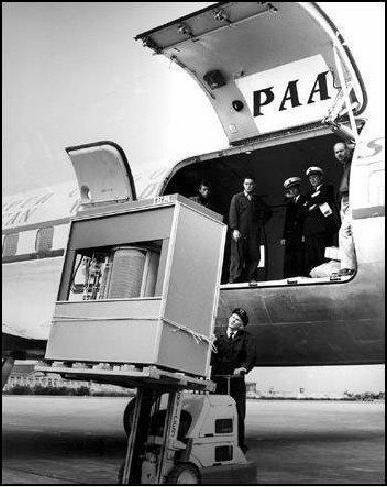
Secondary storage is usually external devices such as a printer or filing cabinet.
A 1956 IBM 305 RAMAC Hard Disk Drive with 5 MB of storage - weighed in at over 1 ton. Annual lease cost was about $35,000
A storage device is the computer hardware that records and / or retrieves items to and from storage media.
Hard disks can store date using longitudinal recording or perpendicular recording.
Hard Disks - The harddisks circuit board controlls the head actuator and a small motor, The motor spins the platters while the computer is running, Software requests disc access by going through the read/write head (determines the current or new location of the data), The head actuator positions the read/write head arms over the correct location to access the data.
A head crash occurs when a read/write head touches the surface of a platter. This will then usually destroy the disk - Always keeping a backup of your data on a disk.
Backing Up - RAID - Redundant Array of Independtent disks is a group of two or more integrated hard disks. A network attached storage (NAS) device is a server connected to a network with the sole purpose of providing storage.
Hard disk Controllers consist of a special-purpose chip and electronic circuits that control the transfer of data, instructions and information from a disk to and from the system bus. Types of controllers include - SATA, EIDE, SCSI and SAS.
Flash Memory Storage have chips are a type of solid state media and contain no moving parts. Solid State Drives (SSDs) have several advantages over magnetic hard disks. No moving parts, faster speeds.
Flash Memory Storage - CompactFlash, Secure Digital, Micro SD, SDHC, MicroSDHC, xD Picture Card, Memory Stick Pro Duo, Memory Stic Micro (M2)
Cloud Storage - Is an internet service that provides storage to computer users who use the internet.
Optical Discs start data by lasering data into the grooves on a disc. It then reads the data by interpreting the pits and lands (1s and 0s). Don't let your discs suffer from - BitRot.
Allot of data are stored on Tabe, Magnetic Stripe cards and smart cards. The only issue with these older storage devices is
Other Types of Storage are huge volumes of servers. where special hardware for heavy use, maximum availability, and maximum efficiency are used.
Tuesday, August 16, 2011
Hardware in a Comptuer

- The inside of the system unit on a desktop consists of most of the following components;
A Motherboard, RAM, Video Card, CPU, FAN and Ethernet Cards.Processors - The processor, also called the central processing unit (CPU), interpretes and carries out the instructions given by the software. Contains a Control Unit and an Arithmetic Logic Unit (ALU).
Processor -> Memory -> Output Devices (Information), Input Devices (Data) -> Storage Devices.
The control unit is a component of the processor that directs and coordinates most of the operations in the computer.
For every instruction, a processor repeats a set of four basic operations which comprise a machine cycle (Fetch, Decode, Execute, Store).
Determine how you plan to use a new computer before selecting a processor. i.e. An Internet Browser who checks emails daily wouldn't need an i7 that is used by Video Production serivces.
Memory - Consits of electronic components that store instructions waiting to be executed by the processor, data needed by those instructions, and the results of processing the data.
Stores three basic categories of information: The OS, Drivers and Settings.
Each location in memory has an address. Memory size is measured in kilobytes (KB or K), Megabytes (MB), gigabytes (GB) or terrabytes (TB).
KB = 1024 Bytes, MB = 1,048,576, GB = 1, 073, 741, 824, TB = 1,099, 511, 627, 776.
Two types of memory Volatile Memory (Loses its contents when power is turned off) and Nonvolatile Memory (Does not lose contents when power is removed).
There are three different types of RAM chips that exist:
Dynamic RAM (DRAM), Static RAM (SRAM) & Magnetoresistive (MRAM).
RAM chips usually reside on a memory module and are inserted into memory slots.
Read-Only Memory (ROM) refers to memory chips storing permanent data and instructions.
Flash Memory - can be erased electronically and rewritten.
Access time is the amount of time it takes the processor to read from the memory. This is measured in nanoseconds.
Expansion Slots and Adapter Cards
- An expansion slot is a socket on a motherboard that can hold an adapter card.
- An adapter card enhanced the functions of your computer (i.e. Extra Ethernet cards, Videocards, Sound Cards)
Plug and Play is a feature where the computer can automatically configure the adapter cards and other peripherals as you install them.
Ports and Connectors
Firewire ports, HDMI ports, audio in port, network port, composite video in.
A USB Port can connect up to 127 different peripherals together with a single connector. You can attach multiple peripherals using a single USB port with a USB hub.
Buses - A Bus allows the various devices both inside and attached to the system unit to communicate with each other; Data Bus, Address bus. Word size is the number of bits the processor can interpret at any one time.
What are input Devices? An input device is any hardware that allows a computer to receive data. These include; keyboards, mice, joysticks, guitars, remotes, pen inputs, voice input etc.
Digital Cameras:
Two factors affect the quality of digital camera photos:
Resolution, Number of bits stored in each pixel.
Voice input:
Voice input is the process of entering inpt by speaking into a microphone.
Voice recognition is the computer's capability of distinguishing spoken words.
Video input - is the process of capturing full-motion images and storing them on a computer's torage medium.
Scanners and Reading Devices - The image resolution and DPI plays a part in how good the scanned document / image is. Optical character recognition (OCR involves reading characters from ordinary documents. A turnaround document is a document you return to the company that creates and sends it.
Magnetic Stripe Card Readers - Read the magnetic stripe on the back of cards such as: Credit Cards, Entertainment Cards, Bank Cards.
Biometric Inputs such as Iris Recognition System and Fingerprint Reader.
Physically Challenged Users; Devices - keyboards with larger keys, head-mounted pointer, on-screen keyboard.
Linking Words
The objective writing scale for Journalists.
Writing hard news is different as the structure starts like an essay; introduction, argument, conclusion.
A news story is written in a logical manner; answering questions and giving details as it goes along.
Angles
Journalists call the anges different 'takes' on a story; the choices you as the reporter may have for your lead; as an angle.
Example:
Angle 1 - Two children were reunited with their fateher yesterday...
Angle 2 - A relieved father of two children...
Angle 3 - A new law against wicked stepmothers was passed yesterday...
The angle is determined by you and what the editor would like.
Linking words for focus:
Linking Words:
The arrows and coded words reveal how existing information introduces or connects with new information.
Every part is ‘attached’ or connected to the one preceding it.
All succeeding pars contain an element of the story the reader has already met.
Sourcing of Attribution:
The reporter needs to put this person's title position before their name when introducing them in the story unless the person is very, very well known.
If you have the form of attribution places before name of the oranization before the person's title, you do not use commas before and after the person's name.
Almost all stories contain a reference to someone saying something.
Even if you were a first-hand witness, you may still use another person’s words as an ‘expert.’
The person’s AUTHORITY to make the comments he/she made is very important.
The reporter needs to put this person’s title or position before their name when introducing them in the story unless the person is very, very well known.
If the form of attribution places the title of the person you are quoting ahead of the name of the organization the person represents, then you will need a comma before and after the name of the person.
e.g. President of the National Council of Trade Unions (NCTU), Sean Burnett, …
NCTU President Sean Burnett said...
Note: Second style is preferred by most because it saves space.
The second style is preffered by most news agencies.
CMC Markets dealer Josh Whiting said.NOTE: “said” comes AFTER the name or personal pronoun.
Indirect Speech
Indirect Speech also called ‘reported’ speechspeech that is summarised or paraphrased by the writerused without quotation marksmust keep the meaning of the original.
As Indirect speech:
Mr. Smith said he would rather be in the hands of the RAAF than anyone else in a situation like that.
Other Points:
Do not be afraid to repeat "said". Avoid other version such as "claimed", "expressed", "stressed".
Avoid using "according to".
Do not use Adverbs.
Don’t make your new writing colourful. Leave that to your novel.
“ I was not scared.” Mr. Smith said thoughtfully.
Some examples of adverbs:
emphatically, angrily, sympathetically, rudely, loudly, carefully, quickly, etc.
What tense to use?
As a rule, electronic media use present tense and printed media use past tense.
In some case, to convery immediacy, present perfect is used:
The government has warned that interest rates will...
Quotation marks - Use double quotes ("")
The closing of quote mark comes after the punctuation mark that indicates a stop or a pause.
Example:
Don't forget the impact of the story.
Don't forget the local angle.
Don't forget the unusual information in your story.
Don't forget your audiences interest.
Strive for simplicity.
Don't forget to be objective.
- News reporting (hard news stories)
- Fature articles (story containing more than the spot news)
- Interpretive reporting (background and analyis)
- Reviews or Critique (judgement on quality of art work)
- Editorial Writing (analysis, arguments and opinions)
- Syndicated Columns (opinion and musing by good writers)
Writing hard news is different as the structure starts like an essay; introduction, argument, conclusion.
A news story is written in a logical manner; answering questions and giving details as it goes along.
Angles
Journalists call the anges different 'takes' on a story; the choices you as the reporter may have for your lead; as an angle.
Example:
Angle 1 - Two children were reunited with their fateher yesterday...
Angle 2 - A relieved father of two children...
Angle 3 - A new law against wicked stepmothers was passed yesterday...
The angle is determined by you and what the editor would like.
Linking words for focus:
Linking Words:
The arrows and coded words reveal how existing information introduces or connects with new information.
Every part is ‘attached’ or connected to the one preceding it.
All succeeding pars contain an element of the story the reader has already met.
Sourcing of Attribution:
The reporter needs to put this person's title position before their name when introducing them in the story unless the person is very, very well known.
If you have the form of attribution places before name of the oranization before the person's title, you do not use commas before and after the person's name.
Almost all stories contain a reference to someone saying something.
Even if you were a first-hand witness, you may still use another person’s words as an ‘expert.’
The person’s AUTHORITY to make the comments he/she made is very important.
The reporter needs to put this person’s title or position before their name when introducing them in the story unless the person is very, very well known.
If the form of attribution places the title of the person you are quoting ahead of the name of the organization the person represents, then you will need a comma before and after the name of the person.
e.g. President of the National Council of Trade Unions (NCTU), Sean Burnett, …
NCTU President Sean Burnett said...
Note: Second style is preferred by most because it saves space.
The second style is preffered by most news agencies.
“Resources were a touch higher overnight, but oil was a touch weaker, so they didn't get any help from oil stocks,"
CMC Markets dealer Josh Whiting said.NOTE: “said” comes AFTER the name or personal pronoun.
Indirect Speech
Indirect Speech also called ‘reported’ speechspeech that is summarised or paraphrased by the writerused without quotation marksmust keep the meaning of the original.
Indirect Speech Example:“I’d rather be in the hands of the RAAF than anyone else in a situation like that,” Mr. Smith said.
As Indirect speech:
Mr. Smith said he would rather be in the hands of the RAAF than anyone else in a situation like that.
Other Points:
Do not be afraid to repeat "said". Avoid other version such as "claimed", "expressed", "stressed".
Avoid using "according to".
Do not use Adverbs.
Don’t make your new writing colourful. Leave that to your novel.
“ I was not scared.” Mr. Smith said thoughtfully.
Some examples of adverbs:
emphatically, angrily, sympathetically, rudely, loudly, carefully, quickly, etc.
What tense to use?
As a rule, electronic media use present tense and printed media use past tense.
In some case, to convery immediacy, present perfect is used:
The government has warned that interest rates will...
Quotation marks - Use double quotes ("")
The closing of quote mark comes after the punctuation mark that indicates a stop or a pause.
Example:
“ Can it be true?” Mark said. (correct)The basics of a news lead...
“Can it be true”? Mark said. (wrong)
- Write simply. Simple words in the right combination can be powerfully evocative.
- First things first. News writing starts with a bang and then explains itself.
- Always attribute what you say to an authoritative voice.
- A good introduction is everything.
Do not start a lead with a qualifying clauseOther things to remember:
While on a routine patrol, a police officer discovered that burglars had pried open the back door of a liquor store on Collins Street and had stolen more than 100 cases of whisky last night.
Instead, write:
Burglars pried open the back door of aliquor store on Collins Street and stole more than 100 cases of whisky last night.
Don't forget the impact of the story.
Don't forget the local angle.
Don't forget the unusual information in your story.
Don't forget your audiences interest.
Strive for simplicity.
Don't forget to be objective.
Tuesday, August 9, 2011
Computer Security
A computer security risk is any event or action that could cause a loss of or damge to computer hardware, software, data, information or processing. A cybercrime is an online or Internet-based illegal act.
Hackers, Crackers, Script Kiddies, Corporate Spies, Unethical Employees, Cyberextortionists, Cyberterrorists.
Internet & Network Attacks
Information transmitted over networks has a higher degree of security risk than information kept on an organization's premises.
An online security service is a Web site that evaluates your compuer to check for Internet and e-mail vulnerabilities.
Popular Online Security Services include; Audit My PC, McAfee FreeScan, Symantec Security Check, Trend Micro House Call, Panda Freescan, Bitdefender.
Internet and Network attacks can come in the form of Computer Viruses, Worms, Trojans and Rootkits.
An infected computer has one or more of the following symptoms: Operating system runs slower than usual, files become corrupt, screen displays an unusual message, system properties change.
Tips for preventing Viruses:
System Failure
A system failure is the prolonged malfunction of a computer. A variety of factors can lead to a system failure, including: aging hardware, natural disasters, electrical power problems, noise, undervoltages, overvoltages and errors in computer programs.
Backing Up - The Ultimate Safeguard
A backup is a duplicate of a file, program, or disk that can be used if the original is lost, damaged, or destroyed. To back up a file means to make a copy of it.
Offsite backups are stored in a location separate from the computer site.
For backing up their are two categories of backups such as full backups and selective backups. Three-Generation backup policy. The three levels is where three backups are kept - Grandparent, Parent, Child.
Hackers, Crackers, Script Kiddies, Corporate Spies, Unethical Employees, Cyberextortionists, Cyberterrorists.
The I love you Virus in Action
Internet & Network Attacks
Information transmitted over networks has a higher degree of security risk than information kept on an organization's premises.
An online security service is a Web site that evaluates your compuer to check for Internet and e-mail vulnerabilities.
Popular Online Security Services include; Audit My PC, McAfee FreeScan, Symantec Security Check, Trend Micro House Call, Panda Freescan, Bitdefender.
Internet and Network attacks can come in the form of Computer Viruses, Worms, Trojans and Rootkits.
An infected computer has one or more of the following symptoms: Operating system runs slower than usual, files become corrupt, screen displays an unusual message, system properties change.
Tips for preventing Viruses:
- Install a personal firewall program.
- Never open an e-mail attachment unless you are expecting it and it is from a trusted source.
- Install a antivirus program on all of your computers. Update the software and the virus signature files regularly.
- Stay informed about new virus alerts and virus hoaxes.
- Be Proactive about stopping security responses - Threatlists up to date ones to protect against.
- Analyzes all network traffic
- Assesses system vulnerabilities
- Identifies any unauthorized intrusions
- Notifies network administrators of suspicious behavior patterns or system breaches
- Vulnerable computer that is set up to entice an intruder to break into it
Did you Know?
Unauthorised Access and Use
Organizations take several measures to prevent unauthorized access and use such as; acceptable use policy, disable file and printer sharing, firewalls and intrusion detection software.
Digital forensics is the discovery, collection, and analysis of evidence found on computers and networks. Many areas use digital forensics for; Law enforcement, Criminal prosecuters, military intelligence.
Hardware Theft and Vandalism
Hardware theft is the act of stealing computer equipment. Hardware vandilism is the act of defacing or destroying computer equipment.
Software Theft
Software theft occurs when someone steals software, intentionally erases programs, illegally copying or registers and or activates a program obtained illegally.
Organizations take several measures to prevent unauthorized access and use such as; acceptable use policy, disable file and printer sharing, firewalls and intrusion detection software.
Digital forensics is the discovery, collection, and analysis of evidence found on computers and networks. Many areas use digital forensics for; Law enforcement, Criminal prosecuters, military intelligence.
Hardware Theft and Vandalism
Hardware theft is the act of stealing computer equipment. Hardware vandilism is the act of defacing or destroying computer equipment.
Software Theft
Software theft occurs when someone steals software, intentionally erases programs, illegally copying or registers and or activates a program obtained illegally.
System Failure
A system failure is the prolonged malfunction of a computer. A variety of factors can lead to a system failure, including: aging hardware, natural disasters, electrical power problems, noise, undervoltages, overvoltages and errors in computer programs.
Backing Up - The Ultimate Safeguard
A backup is a duplicate of a file, program, or disk that can be used if the original is lost, damaged, or destroyed. To back up a file means to make a copy of it.
Offsite backups are stored in a location separate from the computer site.
For backing up their are two categories of backups such as full backups and selective backups. Three-Generation backup policy. The three levels is where three backups are kept - Grandparent, Parent, Child.
Tuesday, August 2, 2011
Application Software
Application Software consists of programs designed to make users productive and / or assist with personal tasks.
Application Software is used in business to make activities more efficient.
An example of Application Software is outlined by:
Business - Word Processing, S Access, Databases.
Graphics and Multimedia - CAD, Photo Editing, Web Page Authoring.
Home/Personal/Educational - Paint / Image Editor, Games, Family Tree Software.
Application Software are available in a variety of forms; Packaged Software, Customer Software, Web Application, Open Source Software, Shareware, Freeware, Public-Domain Software.
System Software serves as the interface between the user, the application software and the computer's hardware - Utility Programs.
Business Software is application software that assists people while performing business activities - Word Processing, Spreadsheet, Database, Presentation, Note Taking, Personal Information Manager etc.
Spreadsheet Software allows for data to be turned into information. This Information can also be changed into graphically appealing representations of the information.
Presentation Software acts as a visual aid to support a presenter.
Applicaiton Software for Communication - Web Browser, E-Mail, Instant Messaging, ChatRoom, RSS Aggregator, Blogging, Video Conferencing, FTP, VOIP.
The Movement of Portable Devices
With a wide range of business software and the popularity of PDAs in the 21st century it has become a must for cut down versions of a software applications to be scalled down or made avalible for PDAs.
Production tools specialize in a certain type of media. For Example, Audio Editing and the other production tool would be a Video Editor.
Application Software is used in business to make activities more efficient.
An example of Application Software is outlined by:
Business - Word Processing, S Access, Databases.
Graphics and Multimedia - CAD, Photo Editing, Web Page Authoring.
Home/Personal/Educational - Paint / Image Editor, Games, Family Tree Software.
Application Software are available in a variety of forms; Packaged Software, Customer Software, Web Application, Open Source Software, Shareware, Freeware, Public-Domain Software.
System Software serves as the interface between the user, the application software and the computer's hardware - Utility Programs.
Business Software is application software that assists people while performing business activities - Word Processing, Spreadsheet, Database, Presentation, Note Taking, Personal Information Manager etc.
Spreadsheet Software allows for data to be turned into information. This Information can also be changed into graphically appealing representations of the information.
Presentation Software acts as a visual aid to support a presenter.
Applicaiton Software for Communication - Web Browser, E-Mail, Instant Messaging, ChatRoom, RSS Aggregator, Blogging, Video Conferencing, FTP, VOIP.
The Movement of Portable Devices
With a wide range of business software and the popularity of PDAs in the 21st century it has become a must for cut down versions of a software applications to be scalled down or made avalible for PDAs.
Production tools specialize in a certain type of media. For Example, Audio Editing and the other production tool would be a Video Editor.
Software Piracy
Professional Ethics
Professional ethics govern the way moral issues that arise because of a specialist knowledge that a professional attains. It governs how the use of this knowledge should be governed when providing a service to the public.
Social & Ethical Responsibilities
ICT systems and applications:
Moral
Ethicial - Professional Ethics, Code of Ethics.
Legal - Software Piracy.
Health Related Problems.
Social Political.
The Code of Conductthat Australian IT Professionals are governed by are produced by the Australian Computer Society. Their code of ethics can be found on the following link as a PDF file.
There are six main values of the ACS.
1. The Primacy of the Public Interest
You will place the interests of the public above those of personal, business or sectional interests.
2. The Enhancement of Quality of Life
You will strive to enhance the quality of life of those affected by your work.
3. Honesty
You will be honest in your representation of skills, knowledge, services and products.
4. Competence
You will work competently and diligently for your stakeholders.
5. Professional Development
You will enhance your own professional development, and that of your colleagues and staff.
6. Professionalism
You will enhance the integrity of the Society and the respect of its members for each other.
Questions to determine the ethics of an Action
Is it honourable, Is it honest, Does it avoid any possibility of conflict of interest, Is it wihin your competence, Is it fair, Is it considerate (i.e. not wasteful of time & resources)
Discipline is the area of expertise that you happen to be working in or studying. The arts, social science, economics, journalism are all examples of discipline.Ethics may include the following: Moral codes, Morality & Ethics.
Moral Codes - Rules that establish the boundaries of generally accepted behaviour.Age can play a part in the ethics for instance what may have been politically correct in the early 19th century may not be politically correct with the younger generation of Australia today.
Morality - Refers to social conventions about right and wrong human conduct.
Ethics - Are beliefs regarding right and wrong behaviour.
Virtues - Habits that incline us to do what is acceptable.
Vices - Habits that incline us to do what is unacceptable.
Social & Ethical Responsibilities
ICT systems and applications:
Moral
Ethicial - Professional Ethics, Code of Ethics.
Legal - Software Piracy.
Health Related Problems.
Social Political.
The Code of Conductthat Australian IT Professionals are governed by are produced by the Australian Computer Society. Their code of ethics can be found on the following link as a PDF file.
There are six main values of the ACS.
1. The Primacy of the Public Interest
You will place the interests of the public above those of personal, business or sectional interests.
2. The Enhancement of Quality of Life
You will strive to enhance the quality of life of those affected by your work.
3. Honesty
You will be honest in your representation of skills, knowledge, services and products.
4. Competence
You will work competently and diligently for your stakeholders.
5. Professional Development
You will enhance your own professional development, and that of your colleagues and staff.
6. Professionalism
You will enhance the integrity of the Society and the respect of its members for each other.
Questions to determine the ethics of an Action
Is it honourable, Is it honest, Does it avoid any possibility of conflict of interest, Is it wihin your competence, Is it fair, Is it considerate (i.e. not wasteful of time & resources)
Tuesday, July 26, 2011
The Functions of a Computer
A computer has many functions in the real world! Though one of the things to remember is a Computer can't think for itself. A computer also doesn't understand information but it understands data.
The only thing that a computer understands is 1s and 0s and whether it has power or not.
Components of a Computer
The components of a computer consists of input devices, output devices, system unit, storage device & communication device.
Magnetic, optical and SSD are some of the technologies that are used for data storage.
Some communication devices include, optical, laser and copper technology.
Advantages and Disadvantages
Some advantages of using computer systems include speed, reliability, consistency, storage and communications.
The disadvantages of using a computer may include, health risks, violation of privacy, public safety and impact of Environment.
Network and the Internet
The Internet is a worldwide collection of networks that connections millions of places such as government agencies and individuals. The Internet is the infrastructure that enables computers to connect to each other. The web is a service that runs on Internet technology.
Website - Is a collection of related pages and associated items.
Web Server - Is a computer that delivers requested Web pages to your computer.
Web 2.0 - Refers to the Web sites that provide a means for users to interact.Internet > The Internet was originally started as a way for scientists at different locations to share information and work together. It started out as ARPANET in September 1969 and had two main goals to allow information sharing and the ability to function if part of the network was disabled.
Today more than 550 million hosts connect to the internet.
The Internet Engineering Task Force (IETF) and the World Wide Web Consortium (W3C) oversees research and sets guidelines and standards.
Internet 2 connects more than 200 universities and 115 companies to many users.
Evolution of the Internet - Cable Internet Service, DSL, Fiber to the Premises (FTTP), Fixed Wireless, Cellular Radio Network, Wi-Fi & Satellite Internet Services.
An IP Address is a number that uniquely identifies each computer or device connected to the Internet. Domain-Names are the text version of an IP Address. A DNS Server (Domain Name Server) translates the domain into the associated IP Address.
Computer Software
Computers have various software applications and can be broken up into two categories - System Software and Application Software. All computers have System Software which is also commonly known as the Operating System. The second category is Application Software which is the end user software that may include Office or applications that have a specific task in a home or business environment.
Types of Users
Examples of Computer Usage; Home User, Small Office / Home Office User & Mobile Users.
Subscribe to:
Posts (Atom)